 Pensum
Help · Budgeting
Left to assign
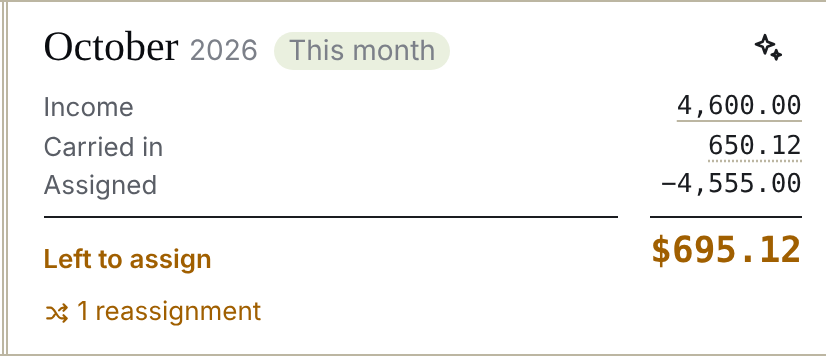
At the top of each month (on phones, at the top of Assign), Pensum adds up:
| Income | Money categorized as income that counts toward this month |
| Carried in | What last month left behind (below) |
| Assigned | Everything you've assigned to categories this month |
Income plus carried in, minus assigned, is what's left.
The three states
- Left to assign (amber): money without a job yet. Assign it: to a category that needs more this month, to savings, or to next month's bills.
- Fully assigned (green): every dollar has a job. This is the goal.
- Over-assigned (red): you've assigned more than you have. Lower some amounts until it's back to zero. Pensum doesn't stop you, but the plan is spending money that isn't there.
Where "Carried in" comes from
Hover or tap the amount to see the breakdown:
- What was left unassigned last month (or over-assigned, which counts against this month).
- Money left over in categories set to start fresh each month, which comes back here.
- Money overspent in categories set to start fresh, which comes out of here.
Categories set to carry forward keep their own balances, so they don't affect it. See Month-end rules.
Common questions
Why did Left to assign change when I didn't touch anything? New income came in (perhaps from bank sync), or a category that starts fresh was overspent last month. Check Income and the Carried in breakdown.
I got a refund. Should it go to Left to assign? Usually not. Categorize a refund to the category it came from, so that category gets the money back. Only income goes to Left to assign.
A bonus came in and Left to assign jumped. Consider keeping bonuses out of your monthly plan. See Extra income.
Still stuck? Signed in, choose Contact support in your account menu, or email [email protected]